Showing posts with label Blogger Duniya. Show all posts

7 STEPS TO CREATE FREE BLOGGER ACCOUNT IN HINDI | 7 चरण में फ्री ब्लॉगर अकाउंट बनाने के हिंदी में |

**1. ब्लॉगर प्लेटफ़ॉर्म की खोज:**


अपने वेब ब्राउज़र में "Blogger" को खोजें और उसे खोलें. यह Google का एक मुक्त सेवा है जो आपको अपने व्यक्तिगत ब्लॉग बनाने में मदद करता है.


**2. Google खाता बनाएं:**


यदि आपके पास Google खाता नहीं है, तो पहले एक बनाएं. इससे ब्लॉगर में साइन इन करना और आपके अन्य Google सेवाओं का उपयोग करना आसान होगा.


**3. ब्लॉग बनाएं:**


अपने Google खाते से साइन इन करने के बाद, ब्लॉगर डैशबोर्ड में जाएं और "नया ब्लॉग" बटन पर क्लिक करें. यह आपको एक नए ब्लॉग तैयार करने के लिए एक नया विंडो दिखाएगा.


**4. ब्लॉग की जानकारी:**


अपने ब्लॉग के लिए एक उच्चतम और व्यापक नाम चुनें और उसके लिए एक यूनिक वेब एड्रेस सेट करें. यह आपके ब्लॉग की पहचान बनाए रखने में मदद करेगा.


**5. टेम्पलेट चुनें:**


अब आपको एक टेम्पलेट चुनने का समय है. टेम्पलेट आपके ब्लॉग की दृश्य को बदल सकता है, इसलिए एक ऐसा चुनें जो आपकी आवश्यकताओं को ध्यान में रखता है.


**6. रखरखाव और भाषा सेट करें:**


ब्लॉग की भाषा और रखरखाव सेट करें. इसमें आप यह निर्धारित कर सकते हैं कि आपके ब्लॉग किस भाषा में होगा और कौन-कौन से लोग इसे देख सकते हैं.


**7. सहेजें और शुरू करें:**


अपनी सेटिंग्स को सहेजें और "ब्लॉग बनाएं" पर क्लिक करें. आपका ब्लॉग तैयार है!


आप ने अब अपना ब्लॉग बना लिया है, और यह आपकी क्रिएटिविटी को दुनिया के साथ साझा करने का एक नया तरीका हो सकता है. इसके बाद, आप विचार, यात्रा, तकनीकी नौकरियां, फोटो या कुछ भी अपने मन की बातें शेयर करने के लिए तैयार हैं!


**ब्लॉग पोस्ट करना:**


ब्लॉग बनाने के बाद, आप अपनी पहली पोस्ट डालने के लिए तैयार हैं. "पोस्ट लिखें" बटन पर क्लिक करें और अपनी जानकारी, फोटो, और संवेदना साझा करें.


**ब्लॉग को अनुकूलित करें:**


आप अपने ब्लॉग को अपनी


 आवश्यकताओं के अनुसार अनुकूलित कर सकते हैं. टेम्पलेट को बदलने, विजेट्स जोड़ने, और ब्लॉग को व्यक्तिगत बनाने के लिए सेटिंग्स में जाएं.


**ट्रैफ़िक बढ़ाएं:**


अपने ब्लॉग को प्रमोट करने के लिए सोशल मीडिया प्लेटफ़ॉर्म्स का उपयोग करें, और अच्छे तरीके से लेखों को अनुवाद करें ताकि आप विभिन्न भाषाओं के लोगों को आकर्षित कर सकें.


**समापन:**


इस तरह, आपने Blogger प्लेटफ़ॉर्म पर एक ब्लॉग बनाने की प्रक्रिया को सरल और सहज बना दिया है. अब आप अपने विचार, अनुभव, और क्रिएटिविटी को दुनिया के साथ साझा कर सकते हैं और अपने पाठकों के साथ जुड़ सकते हैं. शुभकामनाएं!


How To Get Free Domain For Your Website?

 Unlocking the Power of a Free Domain Website: A Comprehensive Guide

In the ever-evolving digital landscape, having a website is paramount for personal expression, business expansion, or creative endeavors. One avenue that makes this journey accessible is obtaining a free domain website. In this comprehensive guide, we will delve into the intricacies of acquiring a free domain website, exploring the benefits, the step-by-step process, and essential tips to make your online venture a resounding success.

How Can I Make My Speed Test Tool?


Understanding the Importance of Speed Testing

Speed Test

Ways To Monetize Your Blogger other than Adsense

Monetization Strategies for Content Creators

Introduction

Brief overview of the importance of monetization for content creators. Mention of Google AdSense as a widely-used platform.

Challenges with AdSense

Discussion on the limitations and challenges associated with Google AdSense. Examples of issues like strict policies, account bans, and revenue fluctuations.

Diversifying Monetization Strategies

Importance of exploring alternative platforms to mitigate risks. Overview of various monetization strategies beyond display ads.

Alternative Monetization Platforms

a. Affiliate Marketing

Explanation of affiliate marketing as a performance-based strategy. Examples of popular affiliate programs and networks.

b. Sponsored Content

Exploration of sponsored content opportunities. Platforms that connect content creators with brands.

c. Native Advertising Networks

Overview of native advertising and platforms that offer native ad solutions. Comparison with traditional display ads.

d. Content Recommendation Platforms

Introduction to platforms that recommend content and pay for clicks. Discussion on integration and revenue potential.

e. Video Monetization Platforms

Focus on platforms that specialize in video content monetization. Comparison with video ads on AdSense.

f. Membership and Subscription Platforms

Exploration of platforms that facilitate subscription-based content. Discussion on building a loyal audience.

Considerations for Choosing Alternatives

Factors to consider when evaluating alternative monetization options. Tailoring strategies to match the content type and audience.

Success Stories and Case Studies

Real-world examples of content creators who have successfully diversified their income streams. Insights into their strategies and experiences.

Common Pitfalls and How to Avoid Them

Identification of potential challenges with alternative platforms. Tips on mitigating risks and optimizing performance.

Conclusion

Summary of key points discussed in the article. Encouragement for content creators to explore and experiment with various monetization options.

Tips to Use HTML and CSS to Make a 3D Card Hover Effect


Wish to create an animation for a 3D card?


1. HTML Handling 


In your IDE, you can copy and paste this HTML code.  The name of an HTML file should be index.html.


2. CSS Layout


Style.css is the correct file name.


Please include both files and replace the 'img' placeholder with your desired image.

Sample Images :


Click the link to watch a live demonstration:


Conclusion:

Creating a 3D card animation for a website adds a visually appealing element to your design. This example demonstrates how to structure your HTML and style it using CSS to achieve a simple yet effective 3D card effect. Feel free to customize the content, styles, and animations according to your project requirements. Experiment with different properties to enhance the visual appeal of your 3D card animation.


Frequently Asked Questions

Q: What is the purpose of your website? A: Our website is dedicated to providing [brief description of your website's purpose].

Q: How can I contact customer support? A: You can reach our customer support team by [providing contact details or a link to the contact page].

Q: Is there a return policy for products/services? A: Yes, we have a [briefly describe your return policy]. For more details, please visit our [return policy page].

Q: Can I modify my account information? A: Certainly! You can update your account information by [providing instructions or a link to the account settings page].

Q: How do I create an account on your website? A: To create an account, simply [provide step-by-step instructions or a link to the registration page].

Q: What payment methods do you accept? A: We accept payments through [list the payment methods you support, e.g., credit cards, PayPal].

Q: How can I track my order? A: Once your order is shipped, you will receive a tracking number and a link to our tracking page. You can monitor your order's progress there.

Q: Do you offer international shipping? A: Yes, we provide international shipping. Shipping costs and delivery times may vary based on your location. Please check our [shipping information page] for details.

Q: What security measures do you have in place for online transactions?

A: We prioritize the security of your transactions. Our website uses [describe security measures, e.g., SSL encryption] to ensure the safety of your personal and financial information.


Diwali Wishing Script 2023


Do you want to earn money by setting up a Diwali Wishing Blogger website using a free WhatsApp viral script?

how to link adsense with blogger

Sign up for AdSense to show ads
  1. Sign in to Blogger.
  2. Click the blog you want to run ads on.
  3. In the left menu, click Earnings.
  4. Click Sign up for AdSense. If you don't see the button, it means your blog might not qualify for AdSense. ...
  5. Fill out the form with your Google Account or create a new one.

how to link another adsense account to blogger

  link another adsense account to blogger
If you're using a Layouts-enabled blog, you can associate an AdSense ad unit with a different AdSense account. To do so, simply follow these steps:
  1. Log into your Blogger account at https://www.blogger.com
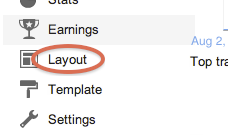
  2. Go to your blog's layout template page by clicking Layout on the left navigation bar.

  3. Blogger layout
  4. Click on the AdSense gadget
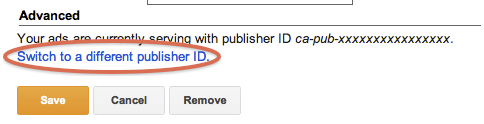
  5. Click on the Switch to a different publisher ID link at the bottom.

  6. Change pubid
  7. Enter your AdSense login (the email address you use to sign in to AdSense).
We'll then update your Google ads to be associated with your preferred AdSense account.

List of Google Adsense High Paying Keywords/Niche 2017

Top 500+ High Paying Google Adsense Keywords 2017


Google Adsense is the best way to make money online. Most Webmasters use this Ad network as their only way to generate income from their websites. But majority of them are tired of low CPC Rates.Even I in the beginning of my career, started wondering that sometimes I got many clicks, but still my earnings are low and sometimes only few clicks, but earnings are much higher. So, that time I wasn’t aware of the fact that, its about Keywords.
Adsense has different Advertisements from various advertisers. All of them have their own company in different field.So, according to their income, they Advertise with Adsense using different Budgets. Some of them have Higher Budgets, So, they are ready to pay

Top 500+ High Paying Google Adsense Keywords 2017

Top 500+ High Paying Google Adsense Keywords 2017


Google Adsense is the best way to make money online. Most Webmasters use this Ad network as their only way to generate income from their websites. But majority of them are tired of low CPC Rates.Even I in the beginning of my career, started wondering that sometimes I got many clicks, but still my earnings are low and sometimes only few clicks, but earnings are much higher. So, that time I wasn’t aware of the fact that, its about Keywords.
Adsense has different Advertisements from various advertisers. All of them have their own company in different field.So, according to their income, they Advertise with Adsense using different Budgets. Some of them have Higher Budgets, So, they are ready to pay

High Paying Google Adsense + Google Adwords Keywords 2017

High Paying Google Adsense + Google Adwords Keywords 2017

  1. mesothelioma survival rates
  2. structured settlement annuity companies
  3. mesothelioma attorneys california
  4. structured settlements annuities
  5. structured settlement buyer
  6. mesothelioma suit
  7. mesothelioma claim
  8. small business administration sba

50 Search Engine for submit your website!!!

50 Search Engine for submit your website!!!


When we running blog, main thing is traffic. we all are
trying to drive more traffic for our website.so search
engines are more important.because people are get the
 information by searching on search engine.if we submit
 out site to search engine, it will help to drive traffic for
 our site.today i got 50 search engine.you can submit your
 site to there and get more traffic.ill give submit link with
 this, i t will more easy to you..

search engine,seo,seo tips,submit,google,yahoo,bing

Add Awesome Table Of Content / Site Map To Your Blogger!

Add Awesome Table Of Content / Site Map To Your Blogger!

Add Awesome Table Of Content / Site Map To Your Blogger!!!

This is also great widget for you blog.Because
Every table of content what categorize, showing
here with links.So, your visitors can check every
post according to categories.Try to add it to your
blog. Its awesome You can check demo from
below link.Earlier also i posted about same thing
with different style.Look at it from here
Hope you will like this.

Add a "Read more" link

Instead of displaying the entire post, you can just show a summary with a link to “Read More:”
  1. Sign in to Blogger.
  2. Click the blog.
  3. Click the post.

Featured post

10 Helpful AI Tools Every Blogger Should Use

10 Helpful AI Tools Every Blogger Should Use. All listed tools are AI-based, copyright-friendly, and ideal for improving writing, visuals, a...